

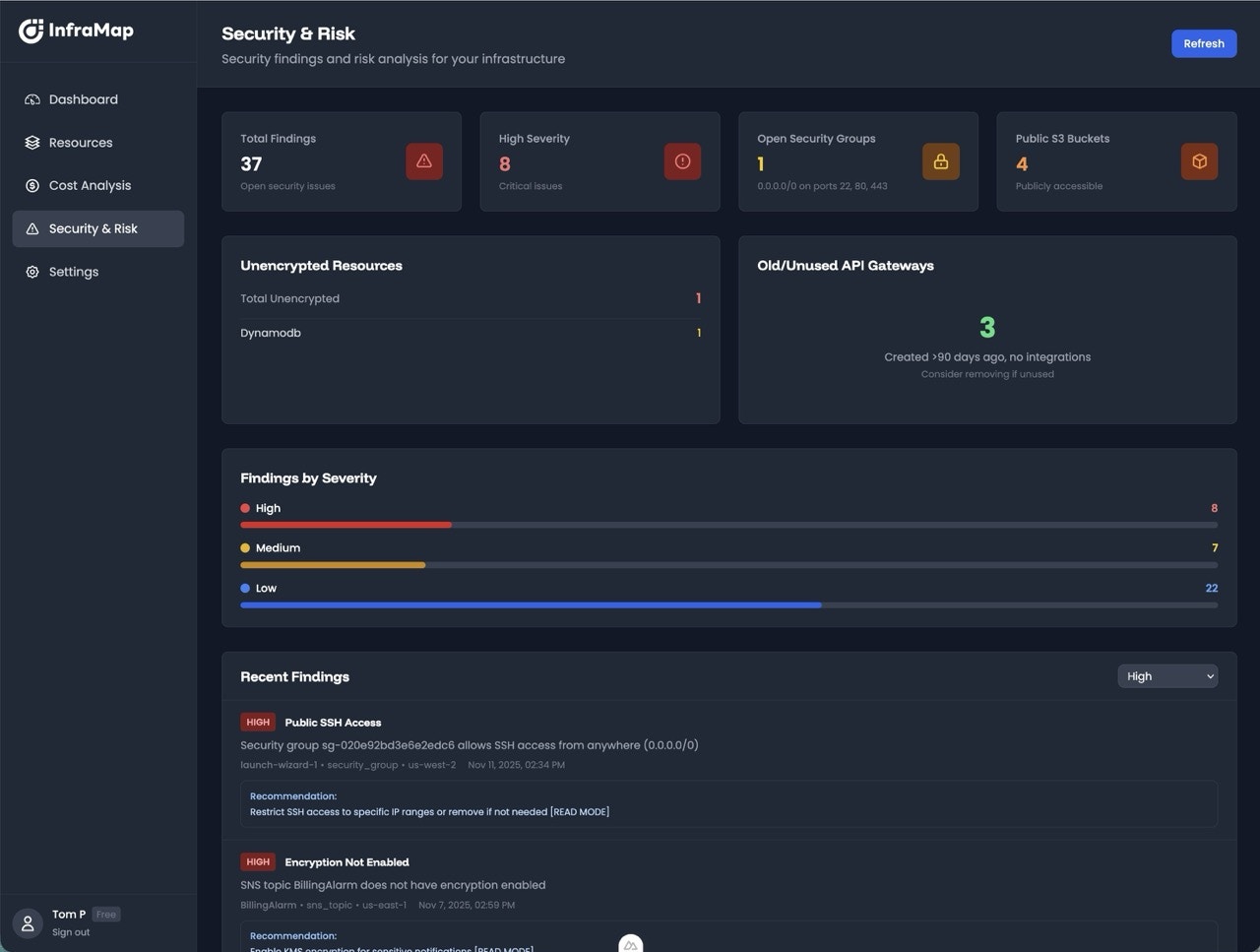
How Security Detection Works
InfraMap analyzes your AWS resources and configurations to detect:- Open ports and exposed services - Resources accessible from the internet
- Public access misconfigurations - Resources with unintended public access
- Encryption issues - Unencrypted data at rest or in transit
- IAM permission problems - Overly permissive policies and roles
- Compliance violations - Deviations from security best practices
- Severity level - Critical, High, Medium, or Low
- Description - What the issue is and why it matters
- Impact assessment - Potential risks and consequences
- Remediation steps - Step-by-step instructions to fix the issue
- AWS Console and CLI instructions - Multiple ways to resolve the issue
Types of Security Findings
InfraMap detects hundreds of different security issues across your AWS infrastructure. Common categories include:- Open ports and exposed services - SSH, RDP, or other ports open to the internet
- Public access misconfigurations - Public S3 buckets, publicly accessible databases
- Encryption issues - Unencrypted EBS volumes, RDS instances, or S3 buckets
- IAM permission problems - Overly permissive policies, missing MFA, unused access keys
- Network security - Misconfigured security groups, open VPC endpoints
- Compliance violations - Deviations from security best practices and standards
Example: Open SSH Ports
Here’s an example of how InfraMap presents security findings: Finding: Security group with SSH (port 22) open to the internet (0.0.0.0/0) What it means: Your EC2 instances are accessible via SSH from anywhere on the internet, allowing anyone to attempt to connect. Why it’s important: Open SSH ports expose your instances to brute force attacks. If credentials are weak or compromised, attackers can gain unauthorized access to your systems, potentially leading to data breaches, compliance violations, or malicious activities like cryptocurrency mining. Impact:- High risk - Potential unauthorized access to EC2 instances
- Data breach risk - Attackers could access sensitive data
- Compliance violations - May violate security policies and regulations
- Cost implications - Compromised instances may be used for malicious activities
- Navigate to the EC2 Console → Security Groups
- Edit the security group’s inbound rules
- Restrict SSH access to your specific IP address or VPN range instead of 0.0.0.0/0
Remediation Instructions
Every security finding in InfraMap includes:- Clear explanation - What the issue is and why it matters
- Impact assessment - Potential risks and consequences
- Step-by-step AWS Console instructions - Detailed walkthrough with screenshots
- AWS CLI commands - Command-line alternatives for automation
- Best practices - Recommendations for secure configurations
Viewing Security Findings
Security Dashboard
The security dashboard provides:- Total findings - Count of all security issues
- Findings by severity - Critical, High, Medium, Low breakdown
- Findings by category - Network, Storage, IAM, Compliance, etc.
- Recent findings - Newly detected issues
- Trends - Security posture over time
Filtering and Search
Find specific security issues:- Filter by severity - Focus on Critical or High severity issues
- Filter by service - View findings for specific AWS services
- Filter by resource - See all findings for a specific resource
Resource-Level Security
View security findings for individual resources:- Resource details page - Security findings section
- Security status - Overall security assessment
- Remediation steps - Instructions specific to that resource
- History - Track when findings were detected and resolved
Resources
View security findings for each resource in your infrastructure.
Infrastructure Maps
See security issues visualized in your infrastructure maps.
Security Best Practices
Regular Security Reviews
Regular Security Reviews
- Review security findings weekly or monthly
- Prioritize Critical and High severity issues
- Track remediation progress
- Document exceptions and justifications
Principle of Least Privilege
Principle of Least Privilege
- Grant only the minimum permissions necessary
- Regularly audit IAM policies and roles
- Remove unused permissions
- Use IAM policy conditions to restrict access further
Defense in Depth
Defense in Depth
- Enable encryption at rest and in transit
- Use security groups and network ACLs
- Implement VPCs with private subnets
- Enable CloudTrail and AWS Config for auditing
Incident Response
Incident Response
- Have a plan for responding to security incidents
- Enable CloudTrail logging
- Set up alerts for suspicious activity
- Regularly test your incident response procedures
Next Steps
- Review your resources to see security findings
- Explore infrastructure maps with security visualization
- Check your plan to unlock advanced security features