

What is Cloud Drift?
Drift is any time your cloud infrastructure does not match what you think it looks like. It’s when the state on AWS (or GCP, Azure, etc.) diverges from:- Your Terraform or CloudFormation definitions
- Your architectural diagrams
- Your security assumptions
- Your team’s expectations
Where Drift Comes From
Drift sneaks into your infrastructure from many sources:Manual Changes in the Console
Quick “temporary” changes that become permanent:- An engineer opens a port “temporarily” for debugging
- A bucket gets a public access policy “for testing”
- An EC2 instance is resized “just for now”
Automation That Nobody Tracks
Orphaned automation continues to modify resources:- Old CI/CD jobs that still run
- Orphaned Lambda functions
- Legacy scripts from former team members
- Scheduled tasks that modify resources
Autoscaling and Ephemeral Resources
Dynamic infrastructure creates drift:- Clusters scale up and down automatically
- New tasks, pods, and ENIs appear and disappear
- It becomes unclear what caused what
- Resources remain attached long after they should be removed
Infrastructure-as-Code Drift
IaC tools and actual infrastructure diverge:- Terraform apply fails partway through
- Someone force-removes a resource manually
- Tags get out of sync between code and reality
- Terraform thinks the world is one thing, AWS shows something else
New Services Added Without Review
Developers spin up resources without visibility:- DynamoDB tables created for testing
- API Gateways set up without documentation
- S3 buckets created without proper policies
- NAT Gateways and load balancers added ad-hoc
Why Drift Is a Serious Problem
Security Gaps
Drift is a leading cause of security vulnerabilities:- Public S3 buckets - Buckets made public for testing that were never secured
- Overly permissive security groups - Ports opened temporarily that remain open
- Missing encryption - Resources created without encryption enabled
- Forgotten IAM policies - Policies left in place after projects end
- Exposed APIs - Endpoints made public during development
Security Features
Learn how InfraMap detects security misconfigurations caused by drift.
Cost Waste
Drift is one of the top drivers of cloud overspend:- Abandoned volumes - EBS volumes detached but never deleted
- Old NAT Gateways - Gateways from decommissioned environments
- Idle EC2 instances - Instances left running after projects end
- Unused API Gateways - Gateways created for testing
- Forgotten RDS instances - Databases from old projects
- Zombie ENIs - Network interfaces that should be deleted
- Stale EKS node groups - Kubernetes resources that are no longer needed
Cost Analysis
Identify cost waste from drifted resources with InfraMap’s cost analysis.
Outages Caused by Surprise Dependencies
Drift creates hidden dependencies that cause outages:- You delete a “test” security group and production breaks
- Someone updates a Lambda layer and three services fail
- A resource appears unused but is actually critical
- Dependencies aren’t documented or understood
Terraform and IaC Failures
Drift makes Infrastructure-as-Code unmanageable:terraform applyerrors due to state mismatches- Resources that can’t be destroyed because of drift
- Stale state files that don’t reflect reality
- Forced imports to reconcile differences
- Scary-looking diffs that nobody wants to approve
How InfraMap Detects Drift
InfraMap continuously monitors your infrastructure by comparing snapshots over time to detect any changes.Continuous Monitoring
InfraMap performs regular scans of your infrastructure:- Daily scans (Free Forever plan) - Capture infrastructure state daily
- Hourly scans (Pro and Enterprise plans) - More frequent detection of changes
- Automatic snapshots - Infrastructure state is captured at each scan
- Change comparison - Each new snapshot is compared to previous ones
Snapshot Comparison
InfraMap detects drift by comparing infrastructure snapshots:- Baseline snapshot - Initial capture of your infrastructure state
- Subsequent snapshots - Regular captures of current state
- Change detection - Comparison identifies differences
- Drift flagging - Changes are flagged and categorized
Types of Changes Detected
InfraMap flags various types of infrastructure changes:Configuration Changes
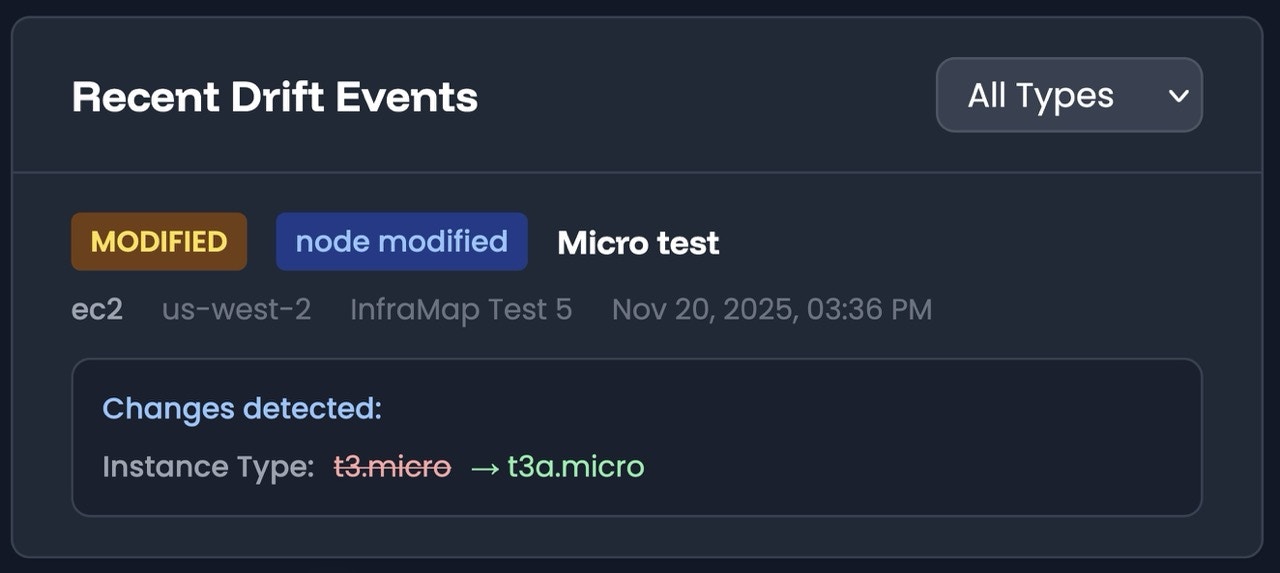
- EC2 instance upgrades - Instance type changes, size modifications
- Security group modifications - Rules added, removed, or changed
- IAM policy updates - Permissions granted or revoked
- Resource tagging - Tags added, removed, or modified
- Network configuration - VPC, subnet, or routing changes
Resource Lifecycle Changes
- New resources - Resources created outside of IaC
- Deleted resources - Resources removed manually
- Resource state changes - Instances started, stopped, or terminated
- Attachments and detachments - EBS volumes, network interfaces, etc.
Relationship Changes
- New connections - Resources connected to new services
- Broken connections - Dependencies removed or changed
- Orphaned resources - Resources no longer connected to anything
Change Notifications
When drift is detected, InfraMap provides:- Change summary - What changed and when
- Resource details - Specific resources affected
- Impact assessment - Potential security, cost, or operational impact
- Email alerts - Notifications for significant changes (Pro and Enterprise plans)
- Change history - Timeline of all detected changes
InfraMap builds a real-time visual map of your entire cloud infrastructure, highlighting configuration changes, unused resources, public exposure, security misconfigurations, and orphaned assets-the exact things that drift silently creates.
Viewing Drift in InfraMap
Drift Dashboard
The drift dashboard provides:- Recent changes - Latest detected changes across your infrastructure
- Change frequency - How often changes are occurring
- Change by service - Which services are changing most
- Change by account - Drift across multiple accounts
- Trend analysis - Patterns in infrastructure changes
Resource-Level Drift
View drift for individual resources:- Change history - Timeline of changes to a specific resource
- Configuration drift - How current config differs from expected
- Relationship changes - How connections have changed over time
- State changes - Lifecycle events and state transitions
Infrastructure Map Integration
See drift visualized in your infrastructure maps:- Change indicators - Visual markers for resources with recent changes
- Drift overlay - Highlight resources that have drifted
- Relationship changes - See how connections have evolved
- Historical comparison - Compare current state to previous snapshots
Infrastructure Maps
Visualize drift in your infrastructure maps.
Resources
View change history for individual resources.
Preventing Drift
While drift is inevitable in cloud environments, you can minimize its impact:Regular Monitoring
- Review drift reports - Check drift dashboard regularly
- Set up alerts - Get notified of significant changes
- Investigate changes - Understand why changes occurred
- Document exceptions - Record intentional changes
Infrastructure-as-Code
- Use IaC consistently - Make all changes through code
- Review IaC changes - Use pull requests and code review
- Reconcile drift - Regularly sync IaC with actual state
- Automate deployments - Reduce manual changes
Access Control
- Limit console access - Restrict who can make manual changes
- Use IAM policies - Enforce least privilege
- Enable CloudTrail - Audit all infrastructure changes
- Require approvals - Use change management processes
Team Practices
- Document changes - Record why changes were made
- Review architecture - Regular reviews of infrastructure
- Communicate changes - Share changes with the team
- Clean up regularly - Remove unused resources
Best Practices
Regular Drift Reviews
Regular Drift Reviews
Review drift reports weekly or monthly to:
- Stay aware of infrastructure changes
- Identify unauthorized modifications
- Catch configuration drift early
- Maintain infrastructure documentation
Investigating Changes
Investigating Changes
When drift is detected:
- Verify if the change was intentional
- Check who made the change (via CloudTrail)
- Assess security and cost impact
- Update documentation or IaC as needed
Reconciling Drift
Reconciling Drift
To reconcile drift with IaC:
- Import drifted resources into Terraform/CloudFormation
- Update IaC definitions to match reality
- Plan and apply changes carefully
- Test changes in non-production first
Preventing Future Drift
Preventing Future Drift
To prevent drift:
- Use Infrastructure-as-Code for all changes
- Limit manual console access
- Set up automated drift detection alerts
- Regularly review and clean up resources
Why Drift Gets Worse as Companies Scale
Drift grows exponentially with:- Number of engineers - More people making changes
- Number of environments - Dev, staging, production, etc.
- Number of regions - Resources spread across regions
- Number of services - More services to monitor
- Number of automation pipelines - More automated changes
“Here’s what changed, here’s what’s risky, and here’s where you’re wasting money.”No guesswork. No detective work. No drift surprises.
Next Steps
- Explore your infrastructure maps to see drift visualized
- Review your resources to see change history
- Check security findings that may be caused by drift
- Analyze costs to find waste from drifted resources
Reference: Learn more about cloud drift in our article: What Cloud Drift Really Means