> ## Documentation Index
> Fetch the complete documentation index at: https://docs.inframap.cloud/llms.txt
> Use this file to discover all available pages before exploring further.
# Resources
> View and explore every AWS resource across all regions. Get detailed information about configurations, relationships, costs, and security.
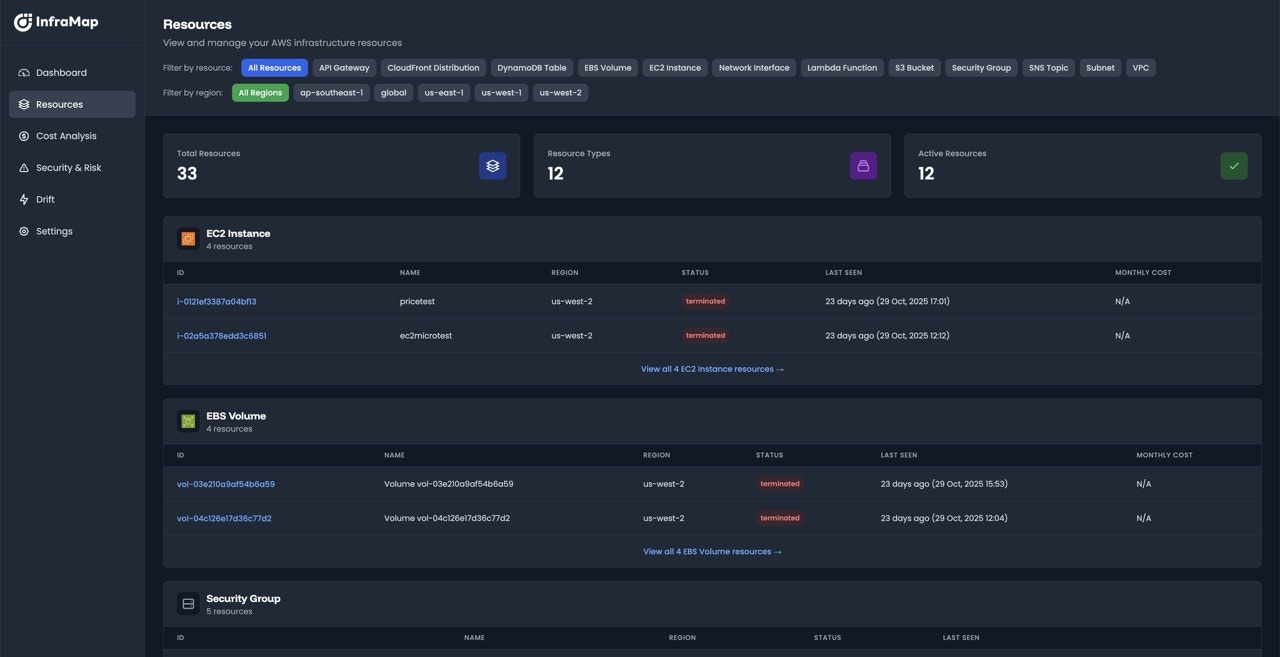 InfraMap provides comprehensive visibility into all your AWS resources across every account and region. Browse your entire infrastructure inventory, drill down into individual resources, and understand every aspect of your cloud environment.
## Resource Inventory
InfraMap automatically discovers and catalogs every resource in your AWS infrastructure. You can view a complete list of all resources organized by:
* **Service type** (EC2, RDS, S3, Lambda, etc.)
* **AWS region** (us-east-1, eu-west-1, etc.)
* **AWS account** (if you have multiple accounts connected)
* **Resource state** (running, stopped, available, etc.)
### Filtering and Search
Quickly find the resources you need using powerful filtering options:
* **Filter by service** - Show only EC2 instances, S3 buckets, or any specific service
* **Filter by region** - Focus on resources in specific AWS regions
* **Filter by account** - View resources across multiple AWS accounts
* **Filter by state** - Show only running, stopped, or terminated resources
## Resource Details Page
Click on any resource to view its comprehensive details page. Each resource page provides complete information about that resource, organized into clear sections:
### Overview
The overview section provides essential information at a glance:
* **Resource name and ARN** - Unique identifiers
* **Resource type** - The AWS service and resource type
* **Region and account** - Location and ownership
* **Creation date** - When the resource was created
* **Current state** - Running, stopped, available, etc.
* **Tags** - All associated AWS tags
### Relationships
InfraMap automatically maps and displays all relationships between resources. The relationships section shows:
* **Connected resources** - See which resources are connected to this one
* **Dependencies** - Resources this resource depends on
* **Dependents** - Resources that depend on this one
* **Visual graph** - Interactive visualization of relationships
Understanding resource relationships helps you identify dependencies before making changes, find orphaned resources, and understand your infrastructure topology.
### Parameters and Configuration
View all parameters and configuration details for the resource:
* **Instance specifications** - Instance types, sizes, and specifications
* **Network configuration** - VPC, subnets, security groups, IP addresses
* **Storage configuration** - Volumes, snapshots, and storage settings
* **Storage metrics** - S3 spaces and number of objects
### Cost Information
Understand the cost implications of each resource:
* **Current monthly cost** - Estimated monthly cost for this resource
* **Cost breakdown** - Detailed cost components (compute, storage, data transfer, etc.)
* **Cost trends** - Historical cost data and trends
* **Idle resource detection** - Alerts if the resource appears unused
## Resource Actions
From the resource details page, you can:
* **View in AWS Console** - Direct link to view the resource in AWS
* **View relationships** - Navigate to related resources
* **View cost history** - See historical cost data
* **View change history** - Track changes over time (Pro and Enterprise plans)
## Resource Types
InfraMap supports detailed views for all major AWS services:
### Compute Resources
* **EC2 Instances** - Instance details, attached volumes, security groups, tags
* **Lambda Functions** - Code configuration, environment variables, triggers, IAM roles
* **ECS Services** - Task definitions, container configurations, load balancers
* **EKS Clusters** - Node groups, pod configurations, networking
* **Fargate Tasks** - Container configurations and networking
### Storage Resources
* **S3 Buckets** - Bucket policies, Size, CORS configuration, versioning, encryption
* **EBS Volumes** - Volume type, size, IOPS, encryption, attachments
### Networking Resources
* **VPCs** - CIDR blocks, subnets, route tables, internet gateways
* **Security Groups** - Inbound and outbound rules, associated resources
* **Load Balancers** - Target groups, listeners, health checks
* **CloudFront Distributions** - Origins, behaviors, caching policies
### Database Resources
* **RDS Instances** - Engine, version, instance class, storage, backups
* **DynamoDB Tables** - Throughput, indexes, streams, encryption
* **ElastiCache Clusters** - Engine, node type, configuration
### Messaging Resources
* **SQS Queues** - Visibility timeout, message retention, dead letter queues
* **SNS Topics** - Subscriptions, delivery policies, encryption
## Best Practices
Review your resource inventory regularly to:
* Identify unused or orphaned resources
* Find resources with security misconfigurations
* Discover cost optimization opportunities
* Track resource changes over time
Use the relationships view to:
* Plan infrastructure changes safely
* Identify dependencies before deletion
* Understand your infrastructure topology
* Find resources that may be affected by changes
Regularly check security findings to:
* Address security misconfigurations promptly
* Ensure compliance with security policies
* Identify resources exposed to the internet
* Review IAM permissions for least privilege
## Next Steps
* [Explore your infrastructure map](/features/maps) to see resources visually
* [Review cost analysis](/features/cost) to optimize spending
* [Check security findings](/features/security) to secure your infrastructure
* [Monitor drift](/features/drift) to track infrastructure changes
InfraMap provides comprehensive visibility into all your AWS resources across every account and region. Browse your entire infrastructure inventory, drill down into individual resources, and understand every aspect of your cloud environment.
## Resource Inventory
InfraMap automatically discovers and catalogs every resource in your AWS infrastructure. You can view a complete list of all resources organized by:
* **Service type** (EC2, RDS, S3, Lambda, etc.)
* **AWS region** (us-east-1, eu-west-1, etc.)
* **AWS account** (if you have multiple accounts connected)
* **Resource state** (running, stopped, available, etc.)
### Filtering and Search
Quickly find the resources you need using powerful filtering options:
* **Filter by service** - Show only EC2 instances, S3 buckets, or any specific service
* **Filter by region** - Focus on resources in specific AWS regions
* **Filter by account** - View resources across multiple AWS accounts
* **Filter by state** - Show only running, stopped, or terminated resources
## Resource Details Page
Click on any resource to view its comprehensive details page. Each resource page provides complete information about that resource, organized into clear sections:
### Overview
The overview section provides essential information at a glance:
* **Resource name and ARN** - Unique identifiers
* **Resource type** - The AWS service and resource type
* **Region and account** - Location and ownership
* **Creation date** - When the resource was created
* **Current state** - Running, stopped, available, etc.
* **Tags** - All associated AWS tags
### Relationships
InfraMap automatically maps and displays all relationships between resources. The relationships section shows:
* **Connected resources** - See which resources are connected to this one
* **Dependencies** - Resources this resource depends on
* **Dependents** - Resources that depend on this one
* **Visual graph** - Interactive visualization of relationships
Understanding resource relationships helps you identify dependencies before making changes, find orphaned resources, and understand your infrastructure topology.
### Parameters and Configuration
View all parameters and configuration details for the resource:
* **Instance specifications** - Instance types, sizes, and specifications
* **Network configuration** - VPC, subnets, security groups, IP addresses
* **Storage configuration** - Volumes, snapshots, and storage settings
* **Storage metrics** - S3 spaces and number of objects
### Cost Information
Understand the cost implications of each resource:
* **Current monthly cost** - Estimated monthly cost for this resource
* **Cost breakdown** - Detailed cost components (compute, storage, data transfer, etc.)
* **Cost trends** - Historical cost data and trends
* **Idle resource detection** - Alerts if the resource appears unused
## Resource Actions
From the resource details page, you can:
* **View in AWS Console** - Direct link to view the resource in AWS
* **View relationships** - Navigate to related resources
* **View cost history** - See historical cost data
* **View change history** - Track changes over time (Pro and Enterprise plans)
## Resource Types
InfraMap supports detailed views for all major AWS services:
### Compute Resources
* **EC2 Instances** - Instance details, attached volumes, security groups, tags
* **Lambda Functions** - Code configuration, environment variables, triggers, IAM roles
* **ECS Services** - Task definitions, container configurations, load balancers
* **EKS Clusters** - Node groups, pod configurations, networking
* **Fargate Tasks** - Container configurations and networking
### Storage Resources
* **S3 Buckets** - Bucket policies, Size, CORS configuration, versioning, encryption
* **EBS Volumes** - Volume type, size, IOPS, encryption, attachments
### Networking Resources
* **VPCs** - CIDR blocks, subnets, route tables, internet gateways
* **Security Groups** - Inbound and outbound rules, associated resources
* **Load Balancers** - Target groups, listeners, health checks
* **CloudFront Distributions** - Origins, behaviors, caching policies
### Database Resources
* **RDS Instances** - Engine, version, instance class, storage, backups
* **DynamoDB Tables** - Throughput, indexes, streams, encryption
* **ElastiCache Clusters** - Engine, node type, configuration
### Messaging Resources
* **SQS Queues** - Visibility timeout, message retention, dead letter queues
* **SNS Topics** - Subscriptions, delivery policies, encryption
## Best Practices
Review your resource inventory regularly to:
* Identify unused or orphaned resources
* Find resources with security misconfigurations
* Discover cost optimization opportunities
* Track resource changes over time
Use the relationships view to:
* Plan infrastructure changes safely
* Identify dependencies before deletion
* Understand your infrastructure topology
* Find resources that may be affected by changes
Regularly check security findings to:
* Address security misconfigurations promptly
* Ensure compliance with security policies
* Identify resources exposed to the internet
* Review IAM permissions for least privilege
## Next Steps
* [Explore your infrastructure map](/features/maps) to see resources visually
* [Review cost analysis](/features/cost) to optimize spending
* [Check security findings](/features/security) to secure your infrastructure
* [Monitor drift](/features/drift) to track infrastructure changes